
Browse Guides and Sections
Start Here
Card Groups
References
NFC Utils Guide
Raw Commands
Inspect protocol exchanges using presets for the selected card. Custom frames give direct access to the command channel and require the correct card and format.
How It Works
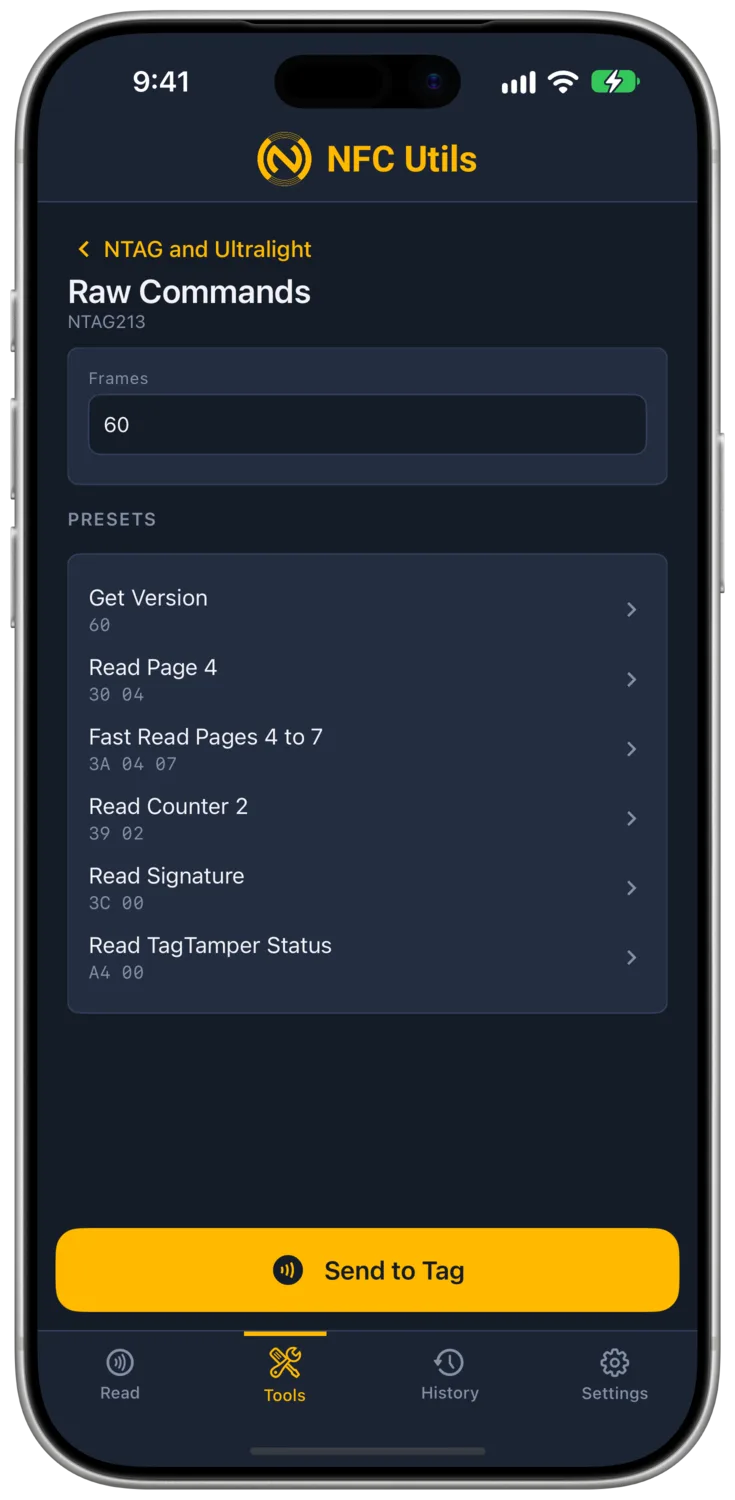
Choose an exact card profile, then Raw Commands. Standard profiles accept hexadecimal frames separated by newlines or semicolons. Presets fill the field with supported read commands; you can edit the bytes before sending.
The result shows the sent frame, the response, and a decode where the app recognizes it. Every profile lists Raw Commands. A frame fails where the connection has no command channel, as on MIFARE Classic.
With Confirm Irreversible Actions enabled, review the raw exchange before scanning. A changed preset is a custom command and can change the card.
Presets by Card
| Profile | Read Presets |
|---|---|
| NTAG and Ultralight | The exact chip determines version, page, fast-read, counter, and signature presets. Legacy profiles omit unsupported version probes. |
| NTAG 424 DNA | Version, NDEF application selection, file settings, key version, capability container, and signature. TagTamper status appears on the TagTamper profile. |
| ICODE and ISO 15693 | System information, blocks, and security status. SLIX2 adds NXP system information and signature. |
| DESFire and Plus | Version and signature commands where the card supports them. |
| Generic Type 4 | Select the NDEF application. |
| Transit and FeliCa | Polling, system codes, supported purse service, and public purse reads. |
A preset can be refused by the card. A signature result requires both a readable signature and an appropriate verification key. See Card Inspection for the limits of originality.
FeliCa Systems and Frames
Read Presets uses the selected system and builds commands from a fresh polling response. This matters when one physical card returns different IDm values for different systems.
- PollingSelects the system and returns its current identifier.
- Request System CodesLists systems using the identifier from the new poll.
- Request Purse ServiceChecks the supported public service for Octopus, Shenzhen Tong, or Japan IC.
- Read Public PurseReads and decodes that supported public purse. A refused service produces an unavailable result.
Custom Frames includes the leading length byte, which counts the entire frame including itself. For example, 06 00 80 08 01 00 is a six-byte Octopus polling frame. Addressed commands need the IDm for the newly presented card and current system. The app rejects malformed lengths or stale identifiers.
FeliCa Lite, Type 3 NDEF, and Common Area can be selected for system inspection. Purse service presets are limited to the three supported transit systems.
Addressed ISO 15693 Frames
ICODE presets are entered without a UID. The app converts them to addressed frames using the card’s UID before sending them through the external reader. The Sent row shows the actual frame, including that identifier.
FeliCa uses its own length-prefixed route over USB and Bluetooth. It does not use the Type 2 transparent session.
Before Sending a Custom Command
Protocol and identifier checks catch a mismatched card or malformed frame. They do not determine whether arbitrary commands are reversible. Review the bytes and the card’s access state before sending.
A rejected NTAG or EV1 password can count toward its configured attempt limit. The app does not automatically resend it. A rejected SLIX2 password can silence the tag until it is lifted. See Type 2 Passwords and ICODE Passwords before using authentication frames.